The task holding your finish date
Every project names the one task that sets its finish, so you know where to push first.
How the engine works →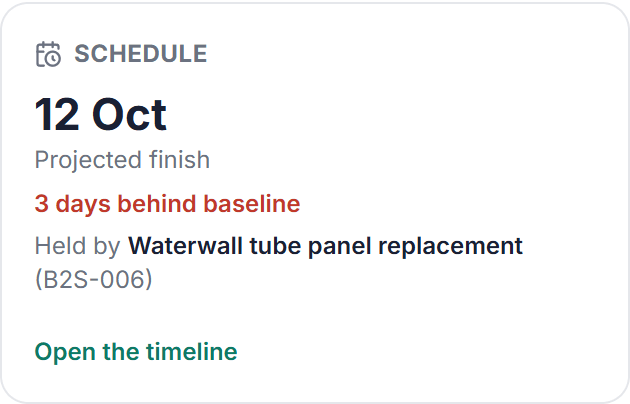
For manufacturing and food plants: shutdowns, upgrades, commissioning and capex
Phaselo works out when each project will really finish, compares it with the date you committed to, and tells you the moment one starts running late. Catch the slip on the plan, not on site.
14-day free trial · No credit card · Founding price $99/month for the first 10 teams

See it in 45 seconds
Straight from the product
Five screens from Phaselo itself, not mockups. Each one answers a question your spreadsheet cannot.
Every project names the one task that sets its finish, so you know where to push first.
How the engine works →A late task shows the days it has lost and how much downstream work it now blocks. You hear about it the same day.
How slip alerts work →
Set your threshold once. A forecast that breaches it flags the project for a supplemental capital request (CER).
How cost tracking works →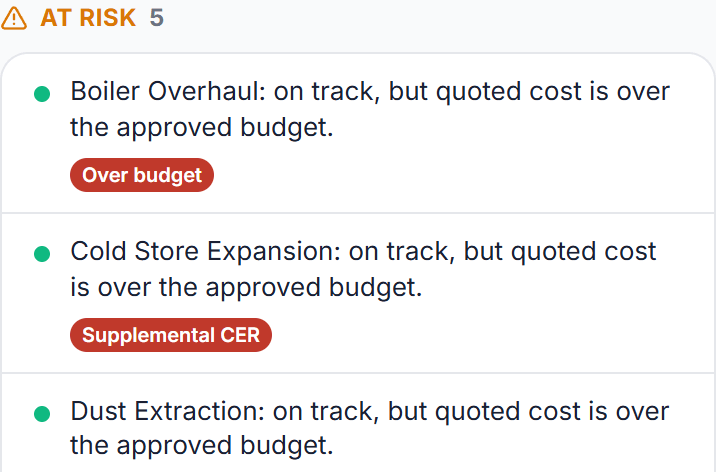
Moving the goalposts takes a written reason, kept on the record next to the slip it explains.
How baselines work →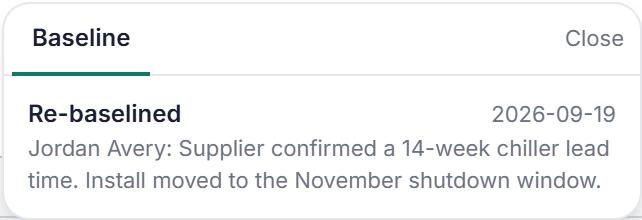
Capital, contingency and running costs, taken from the live plan and frozen the moment you generate it.
How capex requests work →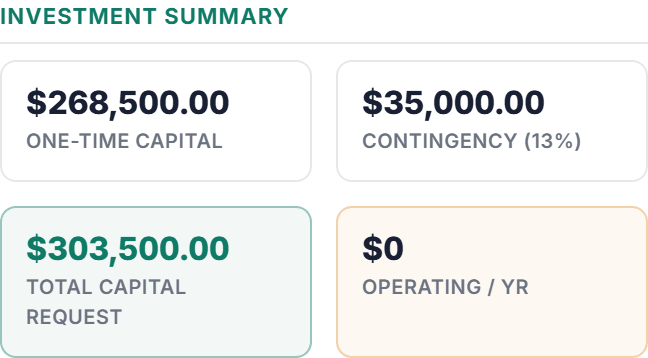
Built for plant projects
Planned shutdowns, equipment upgrades, line commissioning and plant capex: fixed windows, many trades, and a restart date production is counting on.
Industry
Planned shutdowns, Line commissioning, Equipment upgrades
See Phaselo for Manufacturing →Use case
Planned shutdowns, Major turnarounds, Unplanned outages
See Phaselo for Maintenance Shutdowns →Use case
Plant startup, Equipment installation, Cold and hot commissioning
See Phaselo for Equipment Commissioning →Also used by facilities management and construction teams.
Pricing
One price for your whole organisation. No per-seat maths, no reason to leave the crew out. Invite every supervisor and contractor who touches the work and the price does not move.
Early access price $99 a month, held for 12 months for founding teams. The price rises at general launch.
Founding price
$99/month
Held for 12 months. Unlimited people and projects.
No credit card. Subscribe during the trial to hold the founding price.
Standard
$399/month
Or $3,990 a year: two months free, price held for the year.
Applies once the founding places are taken.
Work out your cost
FAQ
Most tools sell a shared plan and a handful of views, which is what your spreadsheet already gives you. Phaselo leads with the governance underneath: a real critical-path engine that works out each project’s finish date and the critical path, a baseline captured at go-live that slip is always measured against, a recorded cause whenever a live date is pushed back or work finishes late, re-baselining that requires a written reason, an append-only audit trail of who changed what and why, and proactive in-app and email alerts when a task goes overdue or a live project is projected past its baseline. Cost rolls up by cost centre into budget, committed, and forecast, and a capex request freezes its figures when you generate it, ready for sign-off in your own approval chain. To be clear about what it is not: no approval workflow, no resource levelling, no AI. Just the projected finish, the honest slip, and the record to back both.
Yes, this is exactly what Phaselo is designed for. Create a phase for each stage of the job, a package for each area of work (electrical, mechanical, civil, commissioning), and tasks for individual items. Set the dependencies between them and Phaselo computes the critical path and the projected finish. Go live to lock the baseline, then track slip against it as the work moves.
Founding teams pay $99 a month, held for 12 months, for the first 10 organisations; after that the price is $399 a month, or $3,990 a year. Either way it is one price for the whole organisation, with unlimited people and unlimited projects. A crew of five pays the same as a crew of fifty. That is deliberate: per-seat pricing charges you for inviting the supervisors and contractors who actually update the work, which is exactly the behaviour that makes the record worth keeping. Every organisation gets the full governance engine. There is a 14-day free trial with no credit card required, and you can cancel anytime.
Yes. Every item has a Resources section where you can add links, documents, quotes, and notes. Link to your scope document, paste in a contractor quote summary, or add a decision note. Everything associated with a task lives in one place instead of scattered across email threads.
Yes. Phaselo is fully mobile-responsive with a bottom navigation bar on small screens. From your phone on site you can check status, start and finish tasks, and raise a punch-list defect with a photo. On the board, drag a card to Done as the work finishes on the floor.
From the blog
Project management
A practical maintenance shutdown planning guide: phases, work packages, backward scheduling, contractor coordination, and the tools that beat Excel.
Read the guide →Equipment commissioning
An equipment commissioning checklist run as a live project plan: 5 phases, cold vs hot commissioning, acceptance tests, punch lists, and a clean handover.
Read the guide →Facilities management
Jira was built for software sprints, not site works. The honest guide to a Jira alternative for operations teams in manufacturing and facilities.
Read the guide →Start a 14-day free trial now, no credit card. Bring your phases, packages and cost centres, and see the projected finish, the slip against baseline, and the dollars at risk across every project.
Founding price $99/month for the first 10 teams