Downtime windows do not flex
The restart is committed to operations and sales, so a task that slips eats into production time you have already promised away.
CAPITAL WORK GOVERNANCE
Project management software for manufacturing gives plant and production managers a projected finish date and the honest slip behind it. You see whether an install lands inside its downtime window before the line is meant to restart, not after.
Now onboarding first teams · No credit card · $8/user/month
The problem
On a plant floor the schedule is not the constraint, production is. You get a fixed outage to swap a drive, retrofit a controls panel, or commission a new line, and the restart time is set before the first bolt comes off. The work then runs late inside a window that cannot move, and nobody can say how late until the shift that was supposed to make product is standing idle.
The restart is committed to operations and sales, so a task that slips eats into production time you have already promised away.
Upgrades and retrofits compete with running lines for access, people, and parts, and the project plan rarely shows which constraint is actually driving the finish.
By the time a late install is obvious it is already past the restart, because nothing flagged the projected finish moving past the window in advance.
When a shutdown overruns and the post-mortem starts, the dates, decisions, and reasons are scattered across emails, whiteboards, and memory.
How Phaselo handles it
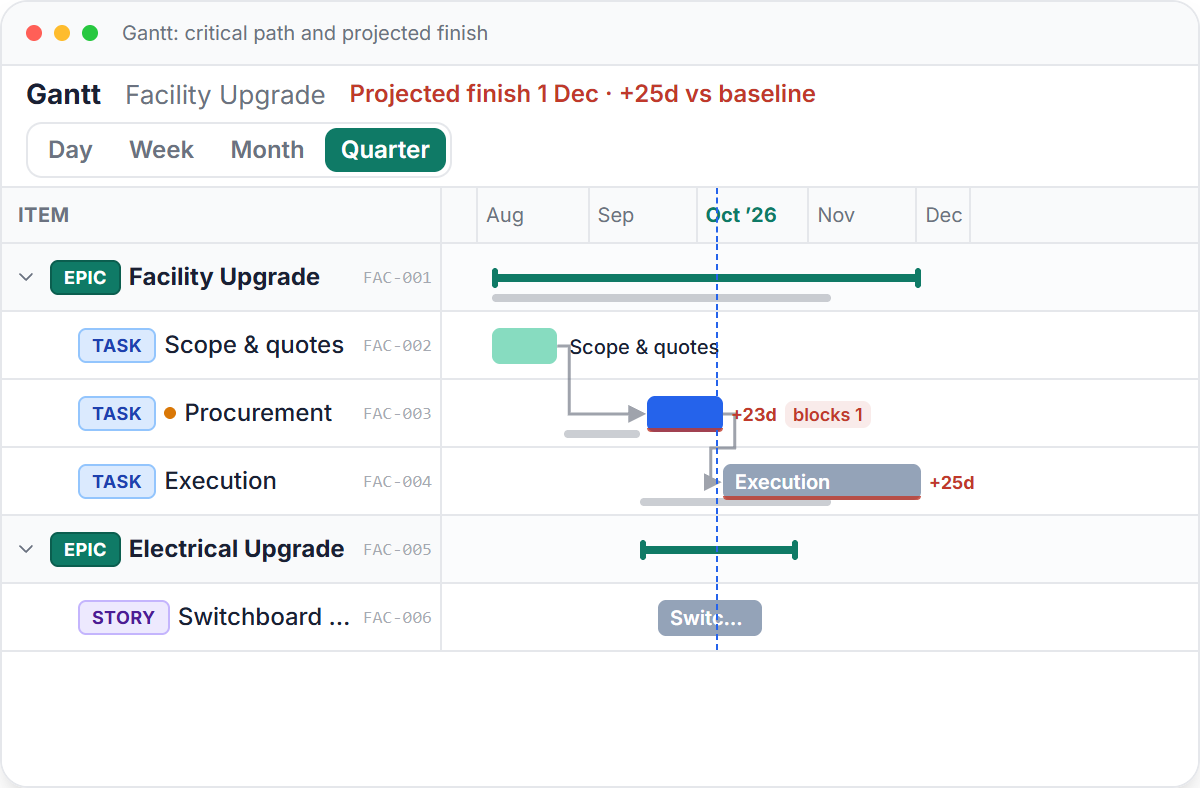
The critical-path engine recalculates the projected finish as progress and dates change, so you know which install actually decides when the line comes back, and the total float on every other task. In-app and email alerts fire the moment a task goes overdue or a live project is projected past its baseline, while the window can still be saved.
The plan is baselined at go-live, and slip on a shutdown or commissioning job is always measured against that captured date, not a number that quietly moved. Re-baselining a project, say when an outage is formally extended, requires a written reason, and an append-only audit trail records who changed what, when, and why for the post-mortem.
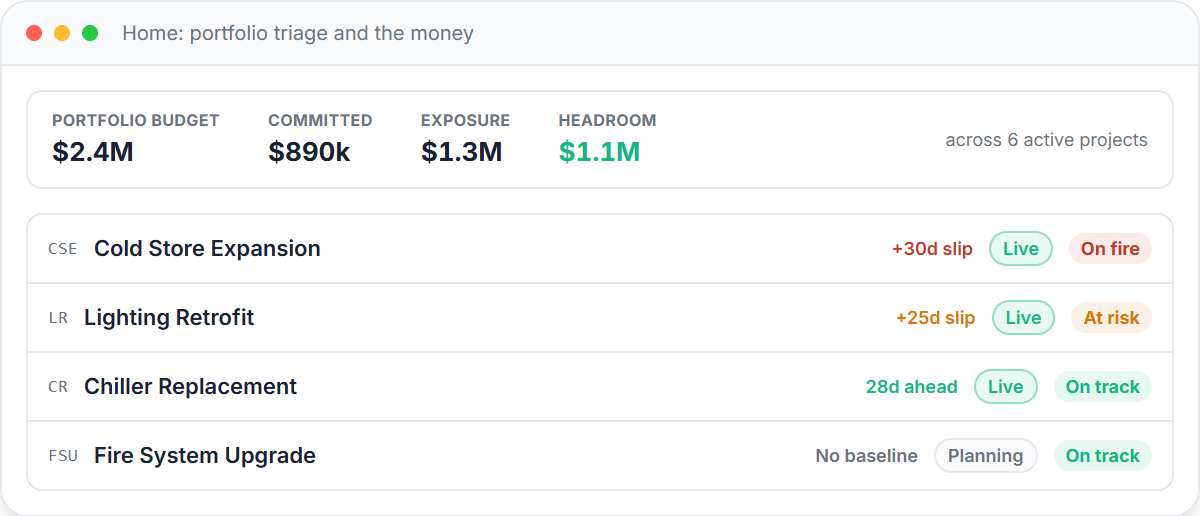
Capital and maintenance spend rolls up by cost centre into budget, committed, exposure, and headroom, so a retrofit's cost position is visible alongside its schedule. A capex request freezes its figures at generation for offline sign-off, and the portfolio triage board sorts every active project into on-fire, at-risk, or on-track.
Built for this work
Break the project into phases, work packages, and tasks, set the dependencies, and Phaselo returns the projected finish and the critical path. Go live to lock the baseline, then track slip against it as the work moves.
Pricing
$8 per user per month, flat. No tiers, no caps. Every plan includes the critical-path engine, baseline governance, the audit trail, slip alerts, and all five views. Now onboarding first teams, no credit card.
FAQ
Look for software that ties schedule to the production restart, not just task lists. Phaselo runs a critical-path engine that gives you a projected finish per project and the float on each task, plus alerts when a job is tracking past its baseline. It is built for plant and production managers running upgrades, retrofits, and shutdowns rather than for generic office work.
Break the outage into phases, packages, and tasks, set dependencies, and baseline the plan at go-live. Phaselo then projects the finish date against that fixed window and alerts you in-app and by email the moment a task goes overdue or the projected finish moves past the restart, while you still have time to act.
Yes. Phaselo's Gantt view shows the actual critical path through the commissioning sequence, not just bars, and recalculates it as progress and dates change. You can see exactly which tasks decide when the line comes back online and how much float the rest of the work has.
Phaselo rolls cost up by cost centre into budget, committed, exposure, and headroom, so an equipment upgrade's money position sits next to its schedule. When you need offline sign-off, a capex request freezes its figures at the moment it is generated so the numbers cannot drift during approval.
No. Phaselo has no approval workflow, no resource levelling, and no AI. It does three things well: the projected finish, the honest slip measured against a baseline, and an append-only audit trail that records who changed what, when, and why to back both.
A practical maintenance shutdown planning guide: phases, work packages, backward scheduling, contractor coordination, and the tools that beat Excel.
Read the guide →An equipment commissioning checklist run as a live project plan: 5 phases, cold vs hot commissioning, acceptance tests, punch lists, and a clean handover.
Read the guide →Try Phaselo free for 14 days, no credit card, unlimited projects, $8 per user per month flat. Run your next shutdown or line install on a projected finish you can trust and a record that holds up after.
Request early access