No surprise overruns
Exposure counts committed and quoted cost as it lands, so headroom shrinks in front of you instead of arriving as a shock at month end.
CAPEX AND COST TRACKING
Capex tracking software that keeps the money in one place: tag costs to cost centres on each item and watch them roll up the work breakdown. Budget, committed, exposure, and headroom, per project and across the portfolio, with a capex request you can freeze for sign-off.
Now onboarding first teams · No credit card · $8/user/month
What it does
Most teams track the schedule in one place and the money in another, so the figure on the boardroom table is always a few weeks behind the project. Phaselo puts costs on the work itself. You tag budget, estimates, quotes, and committed spend to a cost centre on each item, and the numbers roll up the same phase, package, and task breakdown you already use to run the work. The result is one set of figures: what was budgeted, what is committed, what you are exposed to, and how much headroom is left, per project and across the portfolio.
How it works
On each item you set budget, estimate, quote, and committed figures against a cost centre. Items without their own cost centre inherit the nearest ancestor's, so you tag once at the work-package level and every task underneath follows.
Each figure is summed across an item plus all its descendants up the phase, package, task tree. Cost centres aggregate those sums into four numbers: budget, committed, exposure (quoted plus committed), and headroom (budget minus exposure). Change one task and the totals recompute.
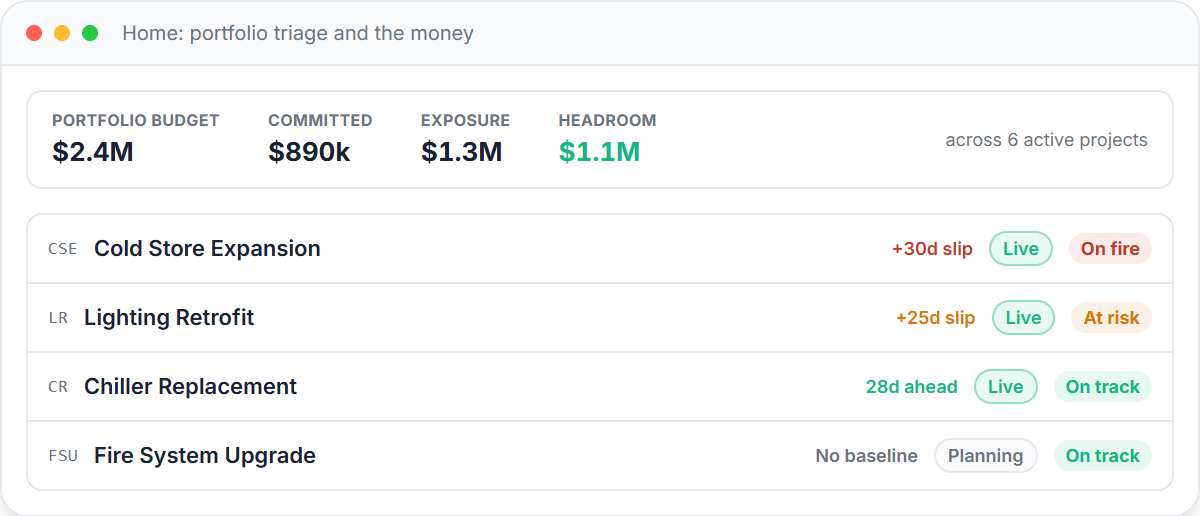
The same four numbers report per project and across a portfolio money strip that totals every active project. Both read the same aggregates, so the portfolio headline can never disagree with the project rows beneath it.
A capex request picks the firmest number per cost centre: a signed commitment if there is one, otherwise a quote, otherwise an estimate. A line with no cost at all is flagged uncosted rather than padded with a placeholder, so reviewers can see exactly which figures are still soft.
Generating the capex request writes an immutable server-side snapshot of the figures plus a capex_generated audit event. The printed document reproduces that snapshot, so the PDF you circulate cannot drift from the live project. Regenerate to capture current figures.
Why it matters
Exposure counts committed and quoted cost as it lands, so headroom shrinks in front of you instead of arriving as a shock at month end.
The capex on the boardroom table is a frozen copy of the same figures the project is actually spending, generated from one source, not a spreadsheet retyped by hand.
The freeze is for offline sign-off through your existing approval chain. There is no built-in approval workflow, and the document says exactly when its figures were frozen.
In the product
Pricing
$8 per user per month, flat. No tiers, no caps. The critical-path engine, baseline governance, the audit trail, slip alerts, the money roll-up, and all five views are in every plan. Now onboarding first teams, no credit card.
FAQ
Committed is the spend you have already locked in, recorded as an append-only ledger on each item and summed up the work breakdown per cost centre. Exposure is the forecast cost once outstanding quotes are counted, the full amount you are on the hook for. Headroom is your approved budget minus that exposure, so it falls as quotes and commitments land rather than at the end of the job. Committed is an obligation, not an invoice, so it moves the moment you award the work.
Generating a capex request writes an immutable server-side snapshot of the figures at that moment, alongside an audit event recording who generated it and when. The printed document reproduces that snapshot, so the PDF you circulate for sign-off cannot drift from later changes to the live project. You can regenerate to capture current figures, which freezes a fresh snapshot.
No, and we are clear about that. The freeze is built for offline sign-off through whatever approval chain you already run. The capex request prints to PDF with Requested, Reviewed, and Approved signature lines, but there is no in-app routing, no approval states, and no notifications to approvers.
Each cost figure is summed across an item plus all its descendants in the phase, package, task tree, then grouped by cost centre. The portfolio money strip totals budget, committed, and exposure across every active project using the same aggregates the per-project view reads, so the two can never show different numbers.
For each cost centre the request takes the firmest evidence available: a signed commitment if there is one, otherwise a quote, otherwise an estimate. A line carrying no cost at all is flagged uncosted rather than filled with a placeholder, so a reviewer can tell at a glance which centres are backed by real numbers and which are still estimates. The request total is then compared against the approved envelope, including contingency.
Jira was built for software sprints, not site works. The honest guide to a Jira alternative for operations teams in manufacturing and facilities.
Read the guide →Phaselo is $8 per user per month, flat, with unlimited projects and a 14-day free trial, no credit card. Put the money on the work, watch it roll up, and freeze the request when it is time for sign-off.
Request early access