The slip number cannot drift
Because the baseline is frozen and only a deliberate, recorded re-baseline can change it, the slip you report today is measured against the same line you set at go live.
BASELINE AND SLIP
Project baseline tracking captures every task date the moment you go live, then measures slip against that fixed snapshot. The baseline does not move on its own, so the slip number stays honest and you can always defend the original commitment.
Now onboarding first teams · No credit card · $8/user/month
What it does
A baseline is the plan you committed to, frozen at go live. Without one, the schedule quietly rewrites itself every time a date moves, and three months later nobody can say how far you have drifted or who agreed to what. Phaselo snapshots every task date when a project goes live, then measures the gap between where the project will finish and where you said it would. Slip is reported per project and per task, drawn straight onto the Gantt, and the snapshot stays put unless you deliberately re-baseline with a written reason.
How it works
When you move a project to live, Phaselo copies every task start and finish date into a baseline record. That snapshot is the commitment you are now measured against, and it is stored separately from the live dates so editing the plan never touches it.
A forward and backward pass over your dependency network returns early and late dates and total float for every task. Zero-float tasks form the critical path, and the longest path through that network gives the projected finish date, recalculated as dates and dependencies change.
Slip is projected finish minus baseline finish. The same subtraction runs at task level, so you see both the headline project slip and exactly which tasks moved to cause it. The numbers update whenever the projection moves, with no manual reconciliation.
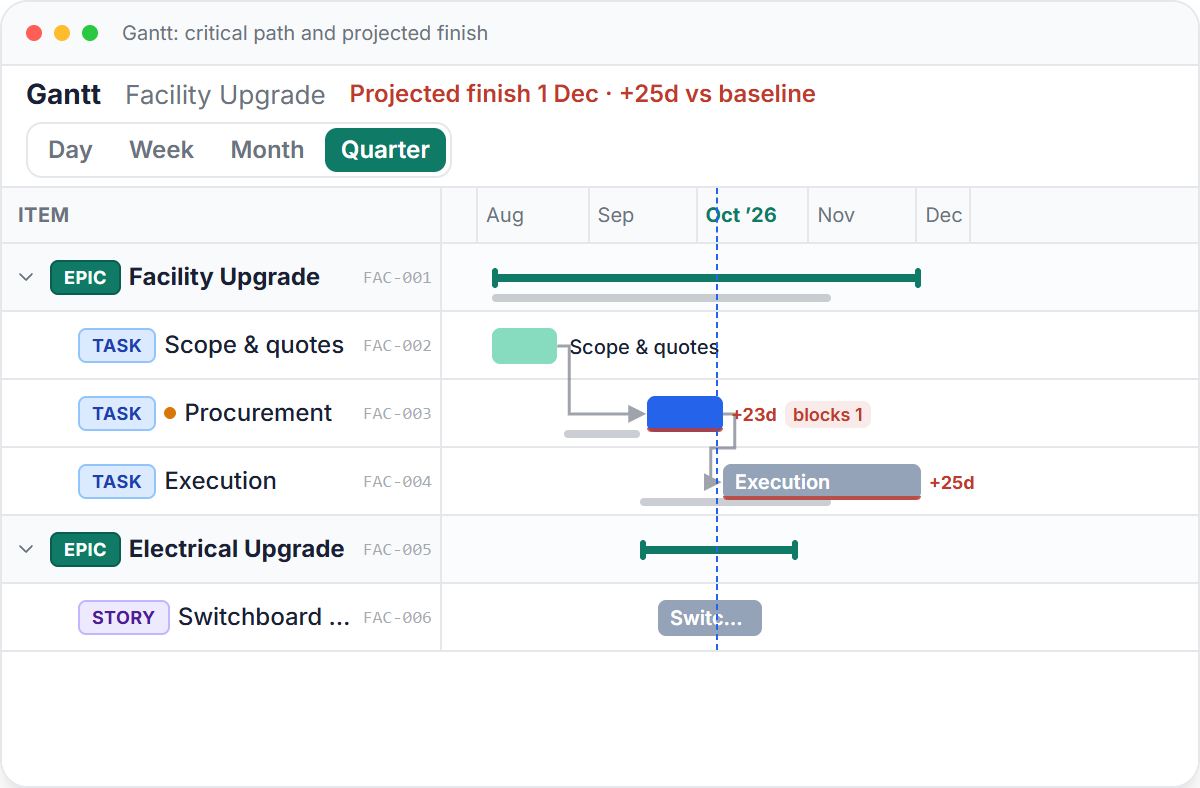
Under each live bar the Gantt draws a baseline ghost bar in its original position, with a slip badge on the bars that have drifted. You read the variance off the chart directly: where the plan was, where the work now sits, and by how much.
The baseline never moves on its own. To reset it you re-baseline deliberately, and Phaselo requires a written reason that lands in the append-only audit trail with who, what, and when. The old commitment and the justification for changing it both stay on the record.
Why it matters
Because the baseline is frozen and only a deliberate, recorded re-baseline can change it, the slip you report today is measured against the same line you set at go live.
The first baseline survives every plan edit, so when someone asks why a project is late you can show what was promised, what changed, and the stated reason it changed.
Slip comes from the critical-path projection against a fixed snapshot, so a schedule that quietly rewrote its own dates cannot hide the gap.
In the product
Pricing
$8 per user per month, flat. No tiers, no caps. The critical-path engine, baseline governance, the audit trail, slip alerts, the money roll-up, and all five views are in every plan. Now onboarding first teams, no credit card.
FAQ
The baseline is captured automatically when you move a project to live. At that moment Phaselo snapshots the start and finish date of every task into a separate baseline record. You do not set it by hand, and it reflects exactly the plan you committed to at go live.
Slip is the projected finish minus the baseline finish. The projected finish comes from the critical-path engine, which runs a forward and backward pass over your dependencies to find the longest path. The baseline finish is the frozen snapshot from go live. Phaselo reports the difference per project and per task.
No. The baseline never moves when you edit the live plan, because the snapshot is stored separately from your working dates. It changes only when you deliberately re-baseline, and that action requires a written reason. There is no silent drift.
Re-baselining takes a fresh snapshot of the current task dates and uses it as the new line for measuring slip. Phaselo requires you to record a written reason first, and that reason, along with who did it and when, is written to the append-only audit trail. The history of the change is permanent.
Open the Gantt view. Each live task bar sits above a baseline ghost bar showing its original position, and tasks that have moved carry a slip badge. You can read the variance straight off the chart: the gap between the ghost bar and the live bar is the slip.
A practical maintenance shutdown planning guide: phases, work packages, backward scheduling, contractor coordination, and the tools that beat Excel.
Read the guide →Phaselo is $8 per user per month, flat, with unlimited projects and a 14-day free trial that needs no credit card. Go live, capture your baseline, and let the slip number stay honest on its own.
Request early access